Showing posts with label Technology. Show all posts
Showing posts with label Technology. Show all posts
Friday, October 7, 2016
Tuesday, October 4, 2016
Digital Citizenship Tech Boot Camp 2016
This year we launched our Digital Citizenship Tech Boot Camp for Middle School students. Here's a slideshow of what it looked like:
Thursday, October 2, 2014
Printing Single-Sided
This week, I've been asked this question a couple of times, How can I print single-sided? Well, the answer is in the following slides. Take a look.
Wednesday, October 1, 2014
EVERNOTE: Better Note Editing, Faster Sync, and 100s of Fixes
I'm so glad that Evernote is paying attention to the demands of their clients. Recently, Evernote released its Mac update and it's awesome. These are my favorite enhancements:
Image resizing:
This one’s a biggie. Any images that you have in a note can be resized by clicking on them and dragging the corner. No more scrolling through enormous images. Just drag them to whatever size works for you. The beauty of this feature is that it’s meant to visually improve your note without changing the original image. If you ever drag the image out, you get it at its original size.

Improved tables:
Spreadsheets are great for finance and formulas, but not if you’re making a list or a project plan. For the majority of your table-making, Evernote is the way to go. With the new table editor you’ll be able to do all the things you expect from a table: delete a row or column, change the color, and drag to resize cells. If you’ve ever struggled with tables in Evernote, this update will make you very happy.

Search notes with Spotlight:
For those of us who prefer keyboard shortcuts to grabbing the mouse, Spotlight is a godsend. With this update, you’re able to use Spotlight to search inside your Evernote account. This is particularly useful when Evernote isn’t in the foreground. Use the keyboard shortcut, command + space and begin typing. Your fingers never leave the keyboard and notes from Evernote will show up in your results. Spotlight is also available by clicking the magnifying glass in the top right corner of your Mac screen, but where’s the fun in that.

Availability:
This update is available to anyone that downloaded Evernote directly from the site. If you use a version of Evernote that you downloaded though the Mac AppStore, then your update is coming very soon.
Monday, September 29, 2014
New Features and Important Updates from Haiku Learning
Meet the Google Drive Picker in Haiku and say Welcome to the Portal Calendar
You can now work more efficiently with the new Google Drive Picker. It’s an easier, faster, one-stop shop for “picking” and adding all kinds of files:
Google Docs:
The new interface looks like a window into your google drive, providing a familiar view of your folders and files from which to choose. Even better—use the search box at the top to let Google find the exact file for you. Click on "Pick from Google Drive".


Google Maps:
NEW! Get any map you need in seconds. Simply type a location. Then click “select” and the picker automatically embeds the map.

Google Videos (aka YouTube):
Stop scrolling to find the embed code and then copying and pasting it. Just use the search box to find a video and choose Select. Below, I'm trying to search for a "Peace" video from "ISB".


Hello Calendar, You're Back!:
Haiku has brought back the newly optimized Portal Calendar, which had been disabled to improve site performance as they investigated the 503 error.

You can now work more efficiently with the new Google Drive Picker. It’s an easier, faster, one-stop shop for “picking” and adding all kinds of files:
Google Docs:
The new interface looks like a window into your google drive, providing a familiar view of your folders and files from which to choose. Even better—use the search box at the top to let Google find the exact file for you. Click on "Pick from Google Drive".
NEW! Get any map you need in seconds. Simply type a location. Then click “select” and the picker automatically embeds the map.
Google Videos (aka YouTube):
Stop scrolling to find the embed code and then copying and pasting it. Just use the search box to find a video and choose Select. Below, I'm trying to search for a "Peace" video from "ISB".
Haiku has brought back the newly optimized Portal Calendar, which had been disabled to improve site performance as they investigated the 503 error.
Sunday, September 28, 2014
Digg Reader a tool for keeping up with sites and blogs
If you were an avid user of Google Reader and you haven't found a replacement for your RSS feed reader, then take a look at Digg. Digg Reader delivers users a fast, efficient, up-to-the minute way to keep up with their favorite sites, blogs and other online sources, via a web-based reading dashboard, along with iOS and Android mobile apps. In addition to full-scale, reverse chronological feed reading, Digg Reader provides an innovative tool to sort posts by popularity. Check it out!
Monday, September 15, 2014
NEW! Lucidchart Diagrams in our Google Apps Domain
A quick blog post about a new tool in our Google Apps domain. From now on students and teachers can use Lucidchart for Education, a web-based diagramming tool that makes drawing diagrams fast and easy. Students can work individually on assignments or with an unlimited number of other classmates to create and edit diagrams in real time -- great for group work. The beauty of all this is that Lucidchart works just like a Google Doc.
I have been working with some Humanities teachers co-teaching about Mind Mapping and creating mind maps using Lucidchart.
Here are some Mind Mapping Guidelines from the web:

Please consider using Mind Maps with your students. From Humanities to Spanish classes, mind mapping can be used in any subject area to help students visually organise information.
Here are a few examples of mind maps. Below, a mind map from a Humanities class on Identity (courtesy of John K.). Here's a student blog post with a mind map created using LucidChart.
.jpg)
This is from a Spanish diagram:

For more information, watch this short video from a world expert in Mind Mapping, Tony Buzan.
With Lucidchart installed for Google Drive, you can:
- Create, open and share Lucidchart documents from Drive
- Export Lucidchart documents as a PNG, JPG or PDF to be stored in Drive
- Share your diagrams with collaborators for feedback and review
Please, let me know if you are interested in using this tool in your class. If you have any questions or issues connecting to LucidChart, don't hesitate to contact me.
So how do students connect to Lucidchart
All students can find Lucidchart Diagram in Google Drive's Create button:

They can also find it under More Apps, next to Haiku Learning:

This is a view of LucidChart.

Wednesday, April 9, 2014
Using Browsers to Help Control Distractions
On a regular school day, you sit down at the computer, and you swear you'll be productive. You open your browser to do one thing and end up checking your Facebook, Twitter, Reddit, or something else? Everyone has those sites that they “only check a couple of times a day”. These can add up to a lot of time without you realising it.
What you haven't done is WORK. No more procrastinating on the web when you need to get your work done! Open your browsers and try these extensions/add-ons and get work done quickly and efficiently! Never let the Internet distract you again. Having good information and constant feedback helps you manage your time better, so you can spend your day the way you’d like.
Here are some web extensions that you can test to improve your productivity and reduce your distractions with two of the most popular web browsers, Google Chrome and Mozilla Firefox.
CHROME EXTENSIONS:
1. Go to https://chrome.google.com/
2. Search for the following extensions:
2. Search for the following extensions:

A simple and intuitive extension that lets you keep track of how you're spending your time on the web. It keeps track of the tab that you are actively using and updates its stats every 3 seconds.

Enforces a 25min/5min workflow: 25 minutes of distraction-free work, followed by 5 minutes of break. Repeat as necessary.

StayFocusd
This productivity extension helps you stay focused on work by restricting the amount of time you can spend on time-wasting websites. Once your allotted time has been used up, the sites you have blocked will be inaccessible for the rest of the day.
FIREFOX ADD-ONS:
1. Go to https://addons.mozilla.org/
2. Search for the following add-ons:
2. Search for the following add-ons:

With Distractus, you can add websites to your black- and whitelist. When you have to do some work, but try to visit a forbidden website, Distractus warns you that there’s risk that you are getting distracted. On every page, you can press the key combination command+option+Q to add the page to your blacklist. Command+option+shift+Q adds the page to the whitelist.

Idderall allows you to setup blocked sites, block periods, and best of all: a deterrent to keep you from accessing settings and unblock sites. Idderall has 3 possible deterrents. What will stop you from going on blocked sites? Perhaps money will talk to you (losing money that is), if not, maybe an intervention from friends, or the potential for being embarrassed on facebook will stop you. If you need to access a blocked site or change your settings, you will need to suffer your chosen deterrent. Idderall is not simple to deactivate like other productivity tools. Idderall cannot be uninstalled or deactivated while a block is active.

Keeps track of the time you spend in your browser, and gives a clear picture of what you were doing all day. It tracks the time you spend in the currently active tab or window of your browser. RescueTime does it’s best to auto-categorise the sites you visit and scores them on a scale from Very Productive to Very Distracting. You can easily fine-tune the defaults to suit your needs. RescueTime lets you see how you spent your time on a day, week, or month basis.
FINAL NOTE:
There are many other extensions and add-ons but these are the ones that I have tested and work well. Please remember. None of these extensions or add-ons will do have any positive effect on your browsing habits unless you give them a try and learn how to customise to suit your own needs. We are not saying that you should not use FB, or Twitter, or any other site. We can’t just give up technology, cold turkey. It is not going to work that way. What is really important is that you learn to control your actions with your technology now or you’re going to end up , according to Dr. Larry Rosen, having a dysfunctional brain, that’s the bottom line. And that will lead to dysfunctional relationships, dysfunctional career, dysfunctional life.
Thursday, November 14, 2013
Have you ever wanted to convert a PDF to Word? Go to nitrocloud
Today I had a colleague come to ask about converting a PDF to Word. She has a few documents that need to be updated and doesn't have access to the source files. This is something that you might want to do once in a while. I had seen this tool before (thanks Chris), so I gave it a try. It was a good chance to test the tool with her.
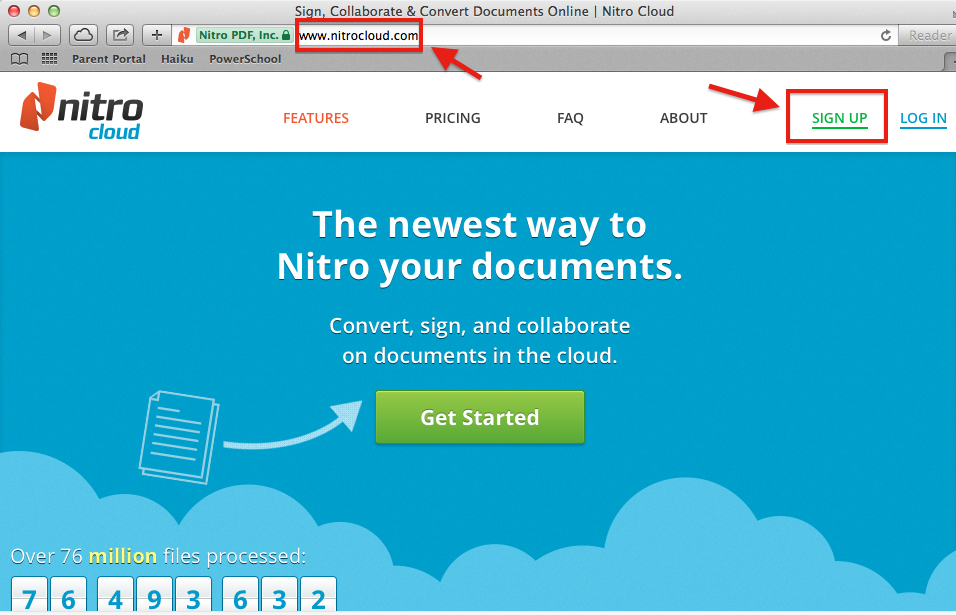
1. So, I had her sign up for an account in www.nitrocloud.com with her name and email and followed the instructions below.


1. So, I had her sign up for an account in www.nitrocloud.com with her name and email and followed the instructions below.

2. In order to convert, you need to "Add New Document".

3. You can also "Drag & Drop" or "Browse my computer".

4. Once the file is uploaded, you can select "Convert".

5. The next question is the format you want to convert to. You can select "Convert to Word".

6. Once the file has been exported to Word successfully, you can click the "Download Word Document".

7. This is a sample PDF that I converted to Word.

Notes:
a. You need to confirm your account by clicking the link sent to your email address. The next option is to create a password to start using your Nitro Cloud account. Finally, it asks you if you want to create a profile photo, in case people you collaborate with or share can more easily recognize you with a profile photo.
b. You can only do 5 conversions for free in one month in the "Basic Plan". If you want to know more about Nitro Cloud, visit their site (www.nitrocloud.com) and see what else they have to offer.
c. This works best when you try to convert a PDF that was created with a word processor like Word.

Let me know if you have any questions. Good luck!
Monday, November 11, 2013
Passion Day @ ISB - November 8th 2013

Want to know how these kids learned to write a computer game? Interested in learning programming? Curious about object-oriented programming and Java? Click here to get more information! Learn to program in real Java code (standard Java) and object oriented program techniques in two-dimensional graphics worlds.

My objective is to inspire an interest in coding and the theme is computer games and implementation.
Monday, November 4, 2013
Videos and more photos from Orchard Project Thailand - November 2013
Before I start, I want to thank Vanessa, Asia, and Xin, students from NIST International School, for being responsible for taking all the footage and shots that you will see in the following videos. They used two HDR-CX430V NTSC video camera recorders and one CANON EOS Rebel XZ camera.

This video, created in iMovie shows a more detailed account of what students went through during their presentations. I've tried to squeeze everything in the video and considering that we started at 10 AM and ended at 12:45 PM, a 17:53 minute video tour will feel like nothing.
This following iPhoto slideshows have pictures from behind the scenes as well as the interactions between the students and their audience. One is 2:30 min and the other under a minute.
Slideshow 1:
Slideshow 2:
Enjoy!

This video, created in iMovie shows a more detailed account of what students went through during their presentations. I've tried to squeeze everything in the video and considering that we started at 10 AM and ended at 12:45 PM, a 17:53 minute video tour will feel like nothing.
This following iPhoto slideshows have pictures from behind the scenes as well as the interactions between the students and their audience. One is 2:30 min and the other under a minute.
Slideshow 1:
Slideshow 2:
Enjoy!
Where is the black Google menu bar? How can I get to Haiku now?
Google has started to make some changes to the way apps are accessed. A few weeks ago for some types of accounts, the black Google menu bar has been replaced by another "apps button". This means that now you will have to do one more click. The menu options have now been placed in an icon next to your email address on the top right of your screen. Click on the "Apps option" as seen below.

At the bottom you may see "More". Select it to open Haiku, for instance.

This option reveals even more apps from Google, where you will be able to find Haiku LMS.

If you check your personal Gmail account, you may see that it may still show the bar like in mine. This may change very soon.


At the bottom you may see "More". Select it to open Haiku, for instance.

This option reveals even more apps from Google, where you will be able to find Haiku LMS.

If you check your personal Gmail account, you may see that it may still show the bar like in mine. This may change very soon.

Saturday, November 2, 2013
Apple Orchard Thailand - November 1, 2013
This Friday, November 1st 2013, the Orchard Project Thailand group presented at the EARCOS Leadership Conference in Bangkok during the “Looking in on Learning: Live” session organised by Apple Education Development in South Asia. A total of 36 students from ISB, NIST, and Harrow worked together for five weeks to share their passions and the way in which they like to learn. The spaces were divided up and participants went around to watch student presentations and asked questions on the ways in which students want to learn. Sessions were based on digital video, video coaching, animation, digital photography, Minecraft, coding and programming. This isn’t technology for them, this is normal life. As educators, as people responsible for learning, it’s important that we understand what students are asking for.
The EARCOS Leadership Conference site presented Abdul Chohan’s Looking In On Learning: Live workshop 1 session on Friday (Apple presentations) with the following short description:
"What constitutes engaging, enabling and empowering learning spaces for both teacher-learners and learners? How do we untether, reposition and restructure perceptions about what authentic learning might look like? Engage with students and teachers in a technology-enabled learning ecosystem to better understand how we can move up the SAMR ladder from substitution to redefinition through "customised" (personalised) learning. Opportunities to discuss the impact of such learning spaces - from inception to implementation and population - with the following guests will be encouraged. Think different. Participants will leave Looking In On Learning: Live, with ideas and resources to help their schools remix a new vision for what technology-enabled learning should include and could look like."
During his introductory presentation, before handing it over to the Orchard Project students, Abdul Chohan focused on the following aspects of personalization:
"In education we’ve always talked about personalisation in a lot of detail. We’ve rarely been able to achieve that. Personalization is really right down to the individual, recognising that if you have 20 or 30 students in your class, each one is very different. We need to have the ability to meet their needs and provide a pathway to learn. Teachers can do that by allowing students to work at their own pace able to access content.
It’s not just about what are the great apps for science or what are the great apps for art and design. It’s a more holistic approach. It’s got to be cultural, sustainable, and we’ve got to build accountability into what we do. These are really core things, otherwise it just becomes just another technology project. It needs to have learning at it’s core.
Take something beyond just the teacher walking around and speaking to all of the students. This is where technology allows us to do something that wasn’t possible before. And it’s not simple translation. It’s not about a worksheet, and now that the same worksheet is on PowerPoint, and because it is coming through a projector, we call it using technology. We are talking about transformation where technology allows us to do things that simply were just not possible before.
So being able to Skype from a classroom to another classroom at a different part of the world. Being able to engage with people that actually live in Spain and speak Spanish, that’s transformational and technology allows that to happen. In the same way personalisation can be achieved. Teachers can create content, students can create content and be very personalised.
Finally, explore iTunesU as a platform for developing personalised learning. Certainly for schools it’s such a powerful environment. It removes the pain of LMSs, Virtual Learning Environments, usernames and passwords, and backend servers and all the other sort of things that make it really difficult. This really simplifies the pathway of learning from the teacher directly to the students and viceversa as well. For schools that are looking at one to one deployment, schools that are looking at iPads, and are looking at how content can be created and shared, this is a really powerful platform that certainly can be shared. We talk about the use of technology and one of our big issues is teachers adopting technology. There is an inherent fear amongst teachers because we’ve always given them stuff that’s not simple and it’s not been reliable. These two ingredients are essential.”
I have to congratulate all the students who took part in this project. They worked really hard to prepare themselves for this moment. They engaged their audience, spoke with a credible voice and managed to share their experiences in a natural way. In their own way. A huge thanks to all the leaders from NIST and Harrow who put up extra hours of work to make this happen. Finally, huge thanks to the Apple Team for their vision, guidance, and support. We know this is just the beginning and can grow to become a model for other schools to adopt.
Overall, it has been a rewarding experience. We definitely see great value and potential in documenting the Orchard Project process and have students tell their stories. This is on the radar and will start to become a reality in the first months of 2014.
Kudos to everyone who helped make this possible!
Wednesday, October 30, 2013
Great Web Tools from EdTechTeacher
I didn't want to end the day without sharing this interesting resource. Even though this site promotes a framework, Collect-Relate-Create-Donate (CRCD), for designing student-centered learning opportunities using computers, it certainly has been able to compile a list of technology tools focused on learning goals consistent with this framework. Unlike other lists that promote "cool tools", yet leave teachers wondering about purposeful educational integration, this list is driven by specific learning goals that promote critical thinking, creativity, collaboration, and community-mindedness. For more information, read the top of this page:
So in order to use this, just click on one of the learning goals below and read the information from the source site.
What are your Learning Goals?
- I want my students to be able to create web based timelines.
- I want my students to create web based mind maps / graphic organizers.
- I want my students to publish their writing online for others to read.
- I want real-time, online discussion with my students.
- I want my students to search and evaluate web sites.
- I want to create guided research activities for my students.
- I want to connect my students to other students around the world.
- I want my students to create online portfolios.
- I want my students to create books, magazines, posters, or newsletters online.
- I want my students to record or edit audio.
- I want to use an interactive whiteboard effectively with my students.
- I want my students to create and edit maps.
- I want my students to draw or create comics on the Internet.
- I want to create tests, quizzes, and games online.
- I want my students to organize, bookmark and edit their research online.
- I want to find or create rubrics for multimedia projects.
- I want to connect to other teachers to share ideas and resources.
For a complete list of their tools and ideas, download their PDF.
Monday, October 28, 2013

Preparing for the Apple Orchard Thailand presentation at the Leadership EARCOS Conference in Bangkok - Thailand
The following 15 MS students from ISB will be absent from school on Friday, November 1st 2013 as they will be presenting at the EARCOS Leadership Conference at the Shangri-La Hotel. They are part of the Apple Orchard Project in Thailand, technology advocates who will be showcasing, modelling and speaking out with a credible voice to school leaders on creating and articulating a vision for connected, personalised learning.
These students have spent two Saturdays working hard from 9 - 4 PM (Sep 28th and Oct 19th) to prepare for this week's conference. If you see them, please commend their hard work and wish them the best when facing school leaders from top schools in East Asia this Friday. Other students will also be representing NIST and Harrow International School.
Participants:
- Kaizad WADIA
- Hokeun CHOI
- Xuanfan LOO
- Sarah GERBER
- Ashka ABRARRIADI
- Matthew ALDEA
- Podsawee LIMSUWANNAROT
- Chacriya SEREEYOTHIN
- Chawin VORAKULSATHIEN
- Ghazy AZIZ
- Taratit YENSUANG
- Thantham MADAN
- Jatearoon BOONDICHARERN
- Michael MCKEEN
- Grayson HEATH
Thanks for your hard work!
In preparation for the Apple Orchard Thailand presentation at the Leadership EARCOS Conference in Bangkok, I'm still looking for some answers to the following questions:
- Will Apple be providing the transportation to the Hotel and back to school?
- Will there be dongles for students that will be taking their MacBook Pros (from ISB)?
- Is it okay to assume that kids can leave the hotel to go back to school by 1:30 PM? FYI, there is a party for MS kids at ISB at 3 PM.
About the groups and presentations, I believe your idea can work. However, I feel that we could have done a better job with those 4 groups that you referred to as weak. Some groups did not get the timely expert guidance that they were told they would get. Yes, I know they are kids and they dream things and think that everything is easy.
There were two groups of boys that I feel were left with little direction. Fortunately one ended up mixing with the Minecraft group of girls. The other group of boys that is doing programming have not taken off yet. I'll try to see them this week and see what we can do together.
Thanks Jane and Apple team for supporting. Thanks to my fellow colleagues from NIST and Harrow for their excellent coaching.
I look forward to seeing you all on Friday. We only have 4 days to go.
Subscribe to:
Posts (Atom)